How to Choose the Right Server Rack for Your Network or Data Center
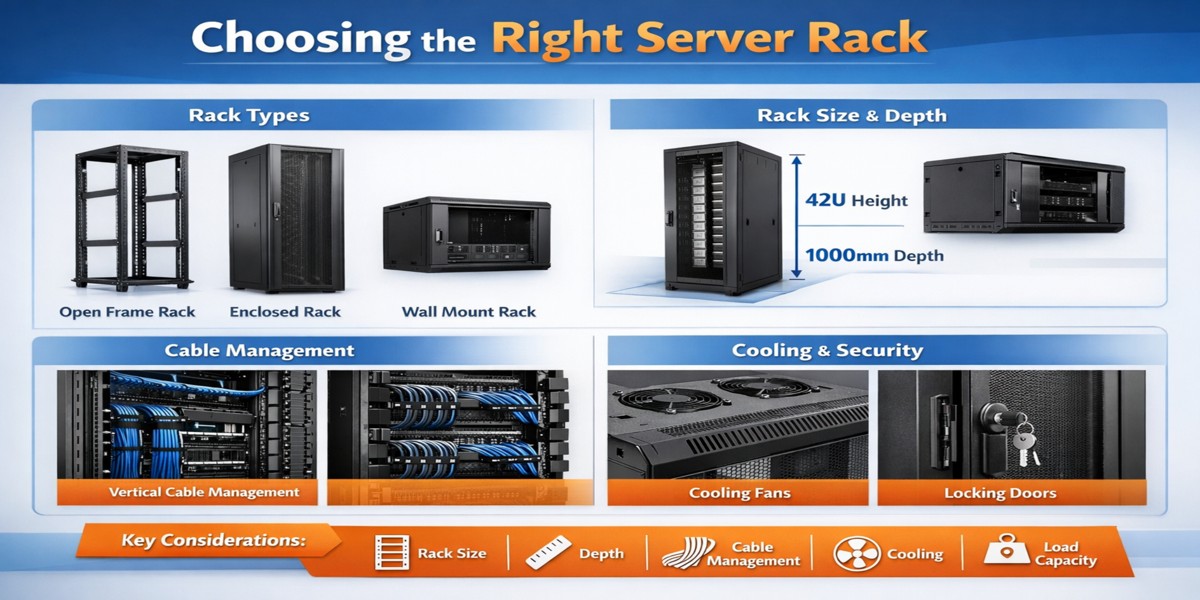
In today’s IT infrastructure, server racks play a critical role in organizing servers, networking equipment, and cables efficiently. Choosing the right server rack helps improve cooling, cable management, equipment protection, and scalability.
Whether you are setting up a small office network or a large data center, selecting the right rack cabinet is essential to ensure your equipment operates safely and efficiently.
This guide will help you understand how to choose the right server rack for your needs.
1. What is a Server Rack?
A server rack is a structured frame or cabinet used to mount and organize IT equipment such as:
- Servers
- Network switches
- Patch panels
- Routers
- Power distribution units (PDUs)
Most racks follow the 19-inch industry standard, allowing equipment from different manufacturers to be installed easily.
Server racks are measured using rack units (U).
1U = 1.75 inches in height
Common rack sizes include:
- 12U rack
- 18U rack
- 27U rack
- 36U rack
- 42U rack
- 45U rack
- 48U rack
2. Types of Server Racks
Before selecting a rack, it’s important to understand the different types available.
Open Frame Racks
Open frame racks are simple structures without doors or side panels.
Advantages
- Easy equipment access
- Better airflow
- Lower cost
Best for
- Server rooms
- Network closets
Enclosed Server Rack Cabinets
These racks come with front and rear doors and side panels.
Advantages
- Equipment protection
- Better cable management
- Improved airflow control
Best for
- Data centers
- Enterprise networks
Wall Mount Server Racks
Wall mounted racks are compact racks installed on walls.
Advantages
- Saves floor space
- Ideal for small equipment setups
Best for
- Small offices
- Retail networks
- CCTV systems
3. Choosing the Right Rack Size
Rack size is measured in rack units (U).
You should calculate the total rack units required for your equipment.
Example:
Equipment Rack Size
Server 2U
Switch 1U
Patch Panel 1U
Total = 4U
However, it is recommended to leave 30–40% extra space for future expansion.
Example:
If your requirement is 24U, consider buying a 36U rack.
4. Consider Rack Depth
Rack depth is important because servers and network devices vary in length.
Typical rack depths include:
- 600 mm
- 800 mm
- 1000 mm
- 1200 mm
Short depth racks
Suitable for switches and patch panels.
Deep racks
Required for servers and storage equipment.
For most server environments, 800mm or 1000mm racks are recommended.
5. Cooling and Airflow
Servers generate a lot of heat. Proper airflow is critical.
Look for racks with:
- Perforated front doors
- Ventilated rear doors
- Top fan modules
These features help maintain optimal equipment temperature.
Poor cooling can lead to:
- hardware failure
- reduced performance
- shorter equipment lifespan
6. Cable Management
Cable management keeps your network organized and easy to maintain.
A good rack should include:
- Vertical cable managers
- Cable routing channels
- Removable cable entry plates
Proper cable management improves:
- airflow
- troubleshooting
- equipment maintenance
7. Load Capacity
Always check the weight capacity of the rack.
Heavy racks are required for:
- blade servers
- storage arrays
- UPS systems
Choose racks with strong steel frames and reinforced mounting rails.
8. Security Features
If your servers contain sensitive data, security is important.
Look for racks with:
- Lockable front doors
- Lockable side panels
- Secure rear access
This prevents unauthorized access to your equipment.
9. Expansion for Future Growth
Many businesses underestimate future infrastructure growth.
When selecting a rack, consider:
- additional servers
- storage systems
- network expansion
Choosing a larger rack initially saves money later.
10. Recommended Server Rack Solution
For businesses looking for a durable and professional rack cabinet, consider racks with the following features:
- Heavy-duty steel construction
- Adjustable mounting rails
- Perforated doors for airflow
- Cable management support
- Multiple rack unit options (18U, 27U, 36U, 42U)
These racks provide reliability, scalability, and efficient equipment management.
Conclusion
Choosing the right server rack is essential for building a stable and organized IT infrastructure. The right rack improves cooling, cable management, equipment protection, and scalability.
Before purchasing a rack, always consider:
- Rack size (U height)
- Rack depth
- Cooling and airflow
- Cable management
- Load capacity
- Future expansion
Selecting the correct rack ensures your servers and networking equipment operate efficiently for years to come.